
Cleaning timesheets nobody has to fill in
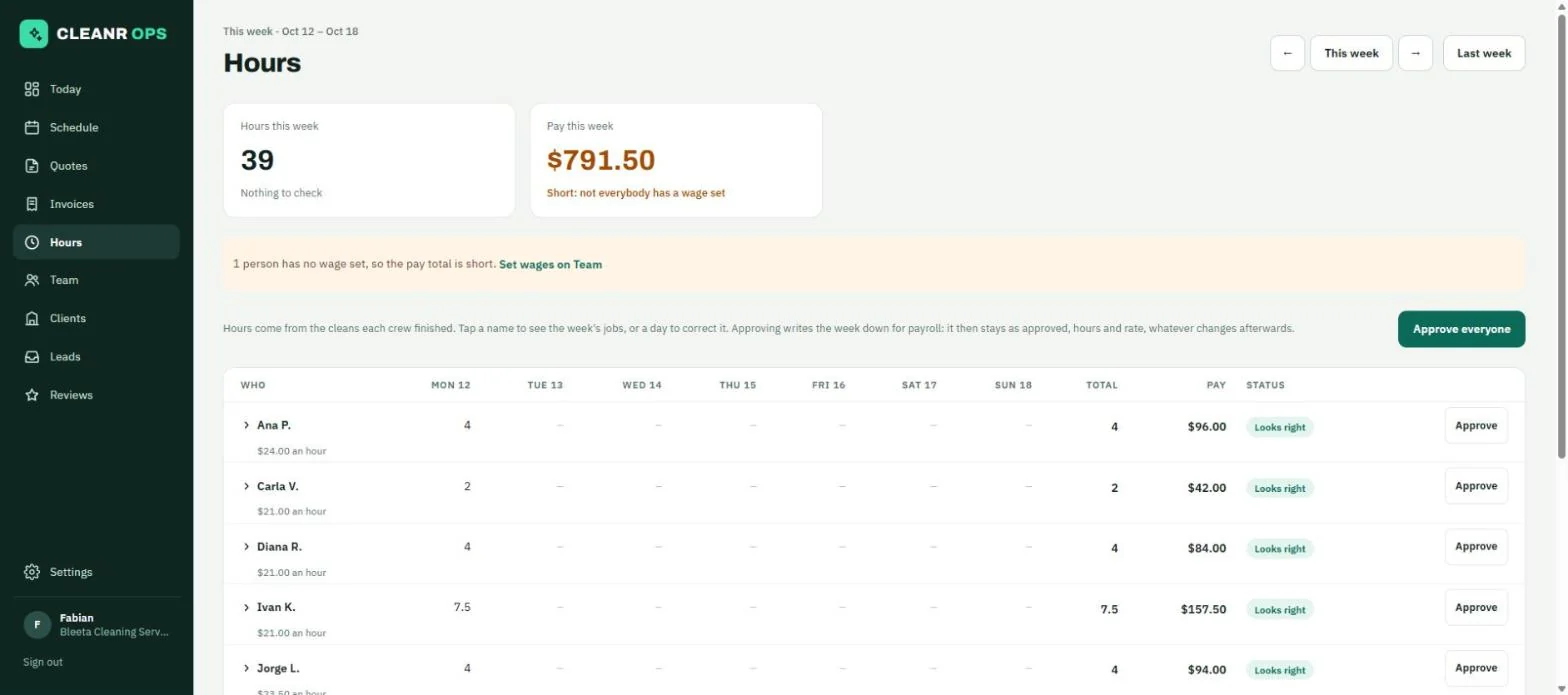
A person’s hours are the cleans their crew finished, counted from their own Start and Finish where they tapped them and from the schedule where they did not. You check the week, correct what was wrong, and approve it.
How it works
The week, person by person
One row per person, Monday to Sunday, with their total and their pay. Tap a name to see each day’s cleans: the address, the job, the client, the hours and what that time cost in wages.
Their own time where they clocked
A clean they tapped Start and Finish on counts for the time between the taps, shown beside the plan ("Clocked 8:05 am to 10:35 am, planned 8:00 to 10:00"). Each tap has a link to where the phone was at that moment, with how sure the phone was.
The days worth a second look
A day is flagged when it was changed by hand, runs over 12 hours, was started and finished more than 500 m apart, was started and never finished, ran half an hour or more off the plan, or has no location recorded.
Pay from each person’s wage
Set an hourly wage on each cleaner and hours become pay. Anybody with no wage shows a dash, never $0.00, and the week says the pay total is short rather than looking complete.
Approved means written down
Approving a day writes its hours and its rate down, so moving a clean next week, or a raise next month, does not rewrite pay that has already been run. Reopen the week to correct it.
There are no breaks, overtime rules or rounding to the quarter hour yet, and no payroll export: you read the approved week into your payroll yourself.
Timesheets and pay is in every plan, including Free (up to 2 people, 15 clients and 40 cleans a month). See all features.
Timesheets and pay: questions
Do cleaners have to fill in a timesheet?
No. Hours come from the cleans their crew finished. If they tap Start and Finish, their own time is used; otherwise the planned length of the clean is.
Can I correct hours?
Yes. Tap a day, type the hours and a note, and save. The day shows what the schedule said beside your figure. Once a week is approved it has to be reopened to change.
Does it work out pay?
Yes, from each person’s hourly wage. It does not run payroll or deductions; it gives you the approved hours and gross pay to put through your payroll.
Start on Free. Stay as long as it fits.
Free for up to 2 people, 15 clients and 40 cleans a month, with every part of the app. No card to start.