
Cleaning scheduling software planned by crew, not by client
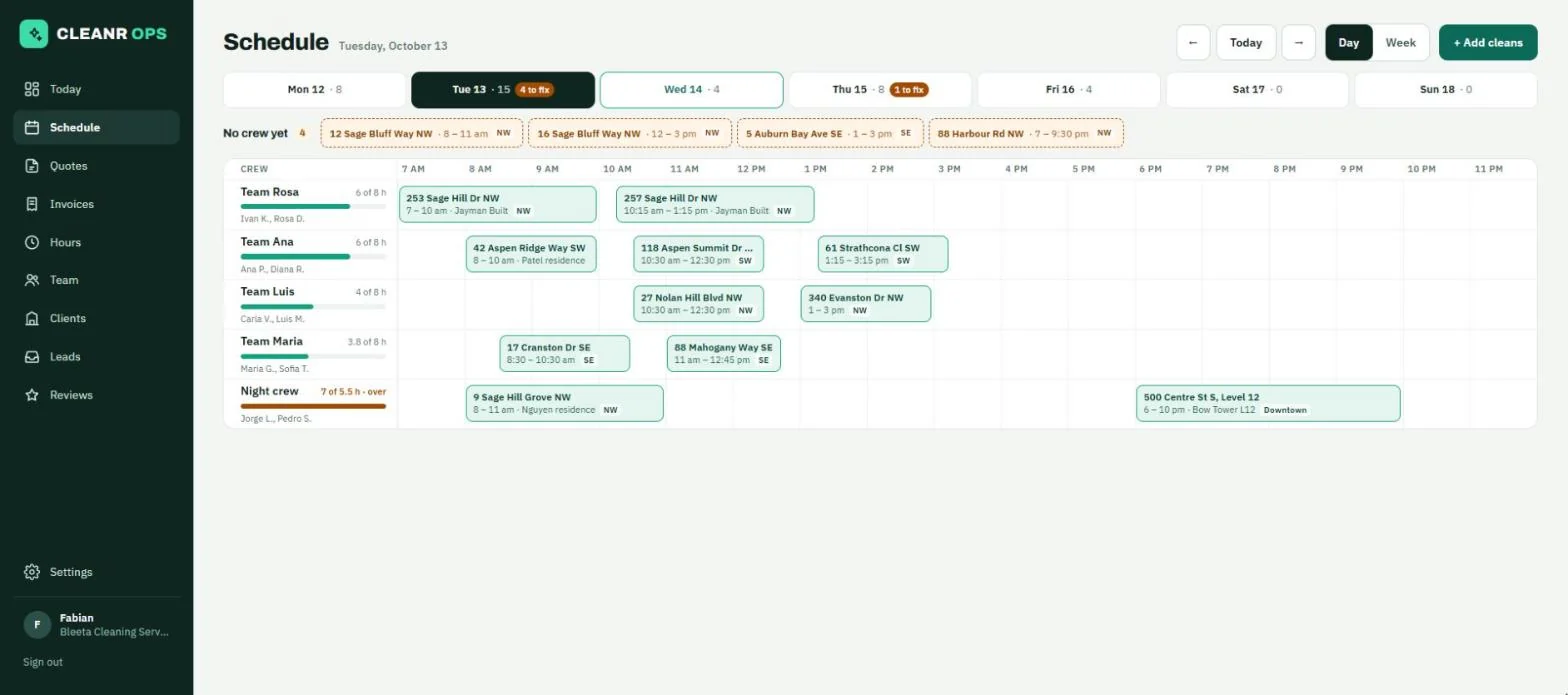
A row per client stops working at forty cleans a day. Crews do not multiply when clients do, so Cleanr OPS plans the day one row per crew: every clean a block at its real time, and every clean nobody has taken yet sitting in a tray where it cannot be missed.
How it works
A timeline per crew
On a computer the day is one row per crew, each clean a block at its true time and length. Each crew shows how full it is against its working hours ("6 of 8 h"), and a thin line marks the time now. On a phone the same day becomes one card per crew, with the time between cleans written out.
Nothing hides without a crew
Every clean with no crew sits in a "No crew yet" tray above the board. Pick one and each crew gets a button: Put it here when the crew is free, Put at 11:15 am when its next gap is later, or Put it here anyway when nothing fits. You can also drag it onto a crew’s row.
Booking that shows who is free
Add cleans opens a panel beside the board, so you can still see who is booked. Pick the client, the address and the job; the client’s price list fills in the money. Crews are listed, not hidden in a dropdown: Free, Busy (with what is in the way) or Outside its hours. The client’s usual crew is marked.
Repeat work, and builders’ lists
Tick the weekdays and repeat every week or every two weeks for up to 26 weeks. For a builder, paste a list of addresses and one clean is booked at each, for the same day, ready to hand out to crews.
Double bookings in red, on purpose
Two cleans for one crew at the same time are both drawn red on separate lanes, and the day strip counts what needs fixing. The app lets you save a half-rearranged day rather than refusing it.
A note the crew actually reads
Each clean can carry a note for that one visit ("lockbox 4471 this week"). It shows on the crew’s phone under the address.
There is no map, route planning or driving time, a clean cannot run past midnight, and a repeating series is changed one clean at a time.
Crew scheduling is in every plan, including Free (up to 2 people, 15 clients and 40 cleans a month). See all features.
Crew scheduling: questions
Can I schedule both residential and commercial cleans?
Yes. Every clean is booked against a client and one of their addresses, whether that is a homeowner’s house, an office, or one of a builder’s hundred houses. The board treats them the same way: a block on a crew’s row.
What happens when two cleans overlap for one crew?
Both are drawn red on separate lanes and the day is flagged as needing a fix. The app does not stop you saving, because you may be halfway through rearranging the day.
Can a cleaner work alone?
Yes. A cleaner who works alone is a crew of one, and a person can be on more than one crew.
Does it handle recurring cleans?
Yes. Pick the weekdays and repeat every week or every two weeks for up to 26 weeks. Each visit is its own booking, so moving one does not move the rest.
Start on Free. Stay as long as it fits.
Free for up to 2 people, 15 clients and 40 cleans a month, with every part of the app. No card to start.