
A cleaning request form for your website that turns into leads
Set up a request form, paste the snippet into your website, and every request arrives in Cleanr OPS as a lead: who they are, how to reach them, what they want and when. Call back, quote, and turn the winners into clients in one step.
How it works
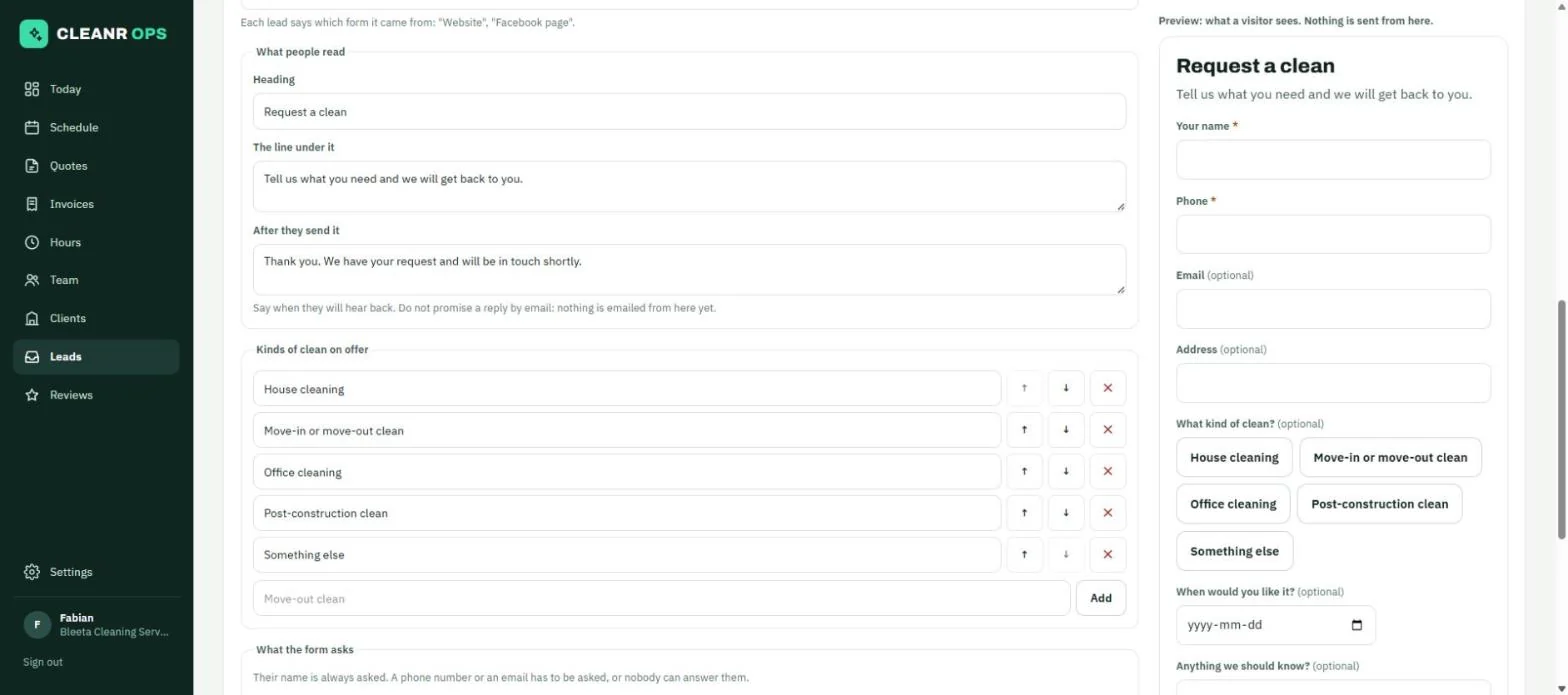
Your questions, your words
Each form has its heading, a line under it, the thank-you, and your list of kinds of clean. Choose which boxes are Required, Optional or Not asked: phone, email, address, kind of clean, date wanted and message. A live preview beside the editor shows exactly what visitors get.
A snippet for any website
Copy a fixed-height version that every website builder takes, or one that resizes itself to fit. The app says which to use for Squarespace, WordPress and Wix. The form also has its own address to link a button to or send to somebody.
In your colours
The form is drawn in your company’s colours. On your website it is a plain card that sits on any page; on its own address it shows your logo.
Leads, by where they stand
Tabs for New, Contacted, Quoted, Won and Lost. Each lead shows which form and which web page it came from, what they wrote, and your own note. Add the ones that phoned by hand.
Make them a client
One button opens a new client filled in from the lead, marks the lead Won and links the two.
Quiet spam protection
A hidden box catches robots without a puzzle for real people, and each address is limited to a few requests in ten minutes.
The app does not yet email or text you when a lead arrives (new leads show on the Today page and the Leads page), does not send the visitor an automatic reply, and has no CAPTCHA.
Request forms and leads is in every plan, including Free (up to 2 people, 15 clients and 40 cleans a month). See all features.
Request forms and leads: questions
Can I put the form on my WordPress, Squarespace or Wix site?
Yes. Copy the snippet and paste it into a Custom HTML block on WordPress, a Code block on Squarespace, or an Embed HTML box on Wix (set to about 1,200 pixels tall).
Will I be notified of a new lead?
Not by email or text yet. New leads appear on the Leads page and on Today under “Needs you”.
Can I have more than one form?
Yes. Make a form for your website and another for your Facebook page, and each lead says which one it came from.
Start on Free. Stay as long as it fits.
Free for up to 2 people, 15 clients and 40 cleans a month, with every part of the app. No card to start.